
An Intelligent Approach to Routing COM Port Data for Stable Device Connectivity
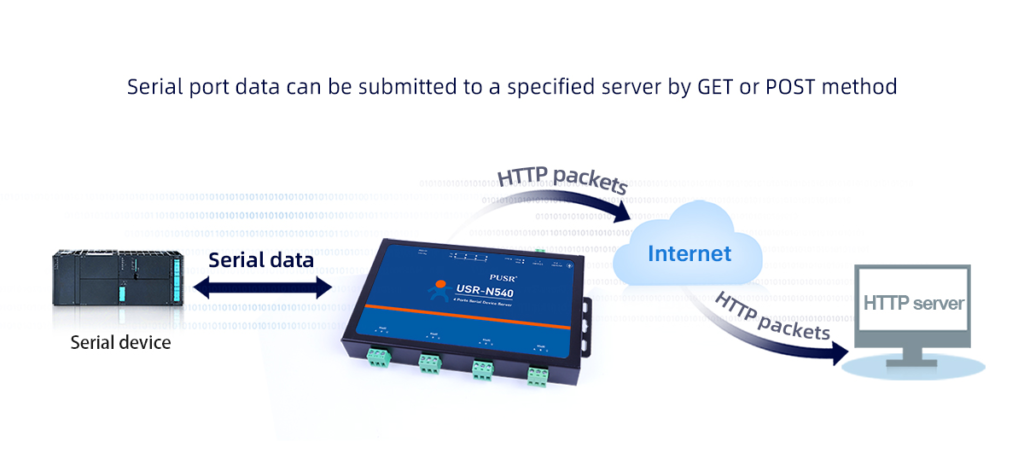
In many factories and industrial settings, older machines still use COM ports to communicate. You might be working with RS232 devices, MODBUS controllers, or GPS equipment. Being able to redirect this COM port traffic lets you access devices from anywhere, makes troubleshooting easier, and helps everything work together smoothly on a modern network.
Why Redirect COM Port Traffic?
COM port redirecting offers several practical benefits. It allows you to connect to serial devices from anywhere over a network and create virtual COM ports for applications that require a physical hardware connection. It also resolves conflicts when multiple programs need to access the same port at the same time and enables the use of older equipment with modern computer systems. This functionality is especially valuable when the equipment is not easily accessible or when several programs need to interact with the same serial device simultaneously.
How to Redirect COM Ports
You can redirect COM ports in two main ways:
1. Software Tools
These applications generate virtual COM ports on your computer and enable the transfer of data across a network or the internet. They typically provide features such as creating virtual COM ports, transmitting data via TCP/IP, monitoring and recording the data in transit, and supporting both Windows and Linux platforms. Companies like AGG Software offer solutions like Advanced Serial Data Logger and Virtual Null Modem, which make it simple to redirect and monitor COM port communications between multiple computers.
2. Hardware Device Servers
These are physical devices where you connect your serial equipment. The device server then links your serial device directly to your local network. While these units are very dependable, they tend to be more expensive and less adaptable than software solutions.
A Simple Guide to Software Setup
To get a COM Port Redirector up and running, start by installing the redirection software on the computer that has the physical serial device connected—this computer acts as the server. Within the software, create a “server connection” and select the real COM port you want to share. Next, enter the network details, including the IP address and port number, and choose the method for transmitting the data, commonly either Raw TCP or Telnet.
On the second computer—the one that will access the device—install the same software. Using the program, create a new virtual COM port and link it to the server computer using the network address you configured earlier. To confirm that the connection is functioning correctly, open a simple terminal program and send a short test message. If the message appears on the server computer, the connection is successfully established. Once everything is verified, the client computer can use the remote serial device just as if it were directly connected.
A Good Tool for the Job
If you need a steady and flexible way to redirect COM port traffic, take a look at AGG Software’s tools. Their tools, like Virtual Null Modem and TCP Splitter, are trusted by many IT experts and technicians. These programs help you share data quickly, create virtual ports, and connect with devices that use common industrial systems.
If you are fixing old machines or building new ones, AGG Software offers easy menus and strong tools that make your job simple.
Where COM Port Redirecting is Used
This technology is widely used across various industries to streamline operations and improve connectivity. On the factory floor, it links production machines and sensors directly to a central control room computer, enabling real-time monitoring and control. In the telecommunications sector, it provides technicians with the ability to access and manage network equipment from remote locations, reducing the need for on-site visits.
In the transportation industry, it captures GPS data from vehicles and integrates it into live tracking systems, ensuring accurate location monitoring. Similarly, at water and power utilities, this technology connects legacy meters and gauges to modern monitoring systems, allowing older infrastructure to work seamlessly with new digital platforms.
Conclusion
Using COM port redirection is a clever method for giving older equipment new life. The right software tools help technicians link their trusted old devices to modern networks. This allows them to continue using their familiar hardware while gaining the benefits of a modern setup, all without sacrificing performance or dependability.